





Planview Tools

Planview Tools Toolbar

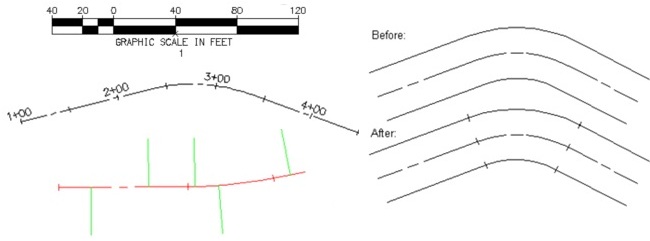
SmartDraft® Planview Tools assist the user to:Planview Tools Examples 1

  • Create stationing and tick marks along alignment *

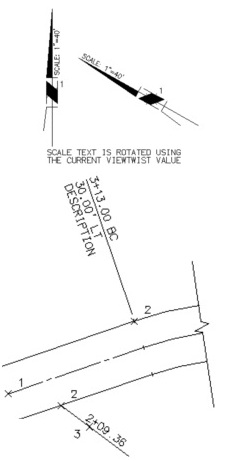
  • Create or list stationing, offset, and create description flags *

  • Create laterals along an alignment *

  • Create tick marks at endpoints of lines and arcs

  • Create data tables for utility and street plans

  • Insert a North Arrow using the current horizontal scale

  • Insert a Barscale using the current horizontal scale

  • Create a typical section line and callout

  • Create coordinate grid ticks

  • Create grid ticks coordinate labeling

  • Create a coordinate label for a selected point

  • Create a label for the Street name and See Sheet Number reference

  • Create a label for the Matchline and See Sheet Number reference

* Uses the AutoCAD® Civil 3D® and AutoCAD® Land Desktop horizontal alignment data


Planview Tools Examples 2


SITE MAP | PRIVACY POLICY | LICENSE AGREEMENT | TERMS AND CONDITIONS

AutoCAD, AutoCAD Civil 3D, AutoCAD Civil 3D Land Desktop Companion, AutoCAD Land Desktop, AutoCAD LT, AutoCAD Map,
AutoCAD Map 3D, Autodesk Navisworks, Autodesk Revit, and Autodesk 3DS Max Design are registered trademarks or trademarks of Autodesk, Inc.,
in the USA
and other countries.  CivilTraining, LLC and SmartDraft are registered trademarks of Wetland Studies and Solutions, Inc.
Microsoft Excel, Microsoft .NET, Microsoft Windows 7, Microsoft Windows Vista, and Microsoft Windows XP are registered trademarks of Microsoft Corporation.
All other brand names, product names, or trademarks belong to their respective holders.