|
Labeling Tools |
SmartDraft® Labeling Allows the Operator to:
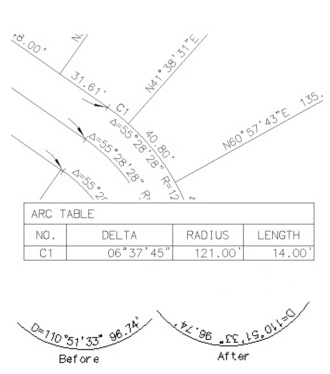 Create labels, leaders, and/or tags using the current Labeling Options and Labeling Style. Supports Civil 3D alignments, parcels, pipe networks, pressure pipes, and feature lines. Create labels, leaders, and/or tags using the current Labeling Options and Labeling Style. Supports Civil 3D alignments, parcels, pipe networks, pressure pipes, and feature lines.
- Set options used for Labeling
- Create and modify label styles to be used with the Label command
- Renumber, consolidate, or zoom to labeling tags
- Create labeling table using the available options and table style
- Create and modify labeling table styles to be used with the Create Labeling Table command
- ALTA label: Label a distance, direction, and description label
- Label a radial bearing
- Create labels, leaders, and/or tags using the current Labeling Options and Labeling Style
- Set options used for Labeling
- Create and modify label styles to be used with the Label command
- Renumber, consolidate, or zoom to labeling tags
- Create labeling table using the available options and table style
- Create and modify labeling table styles to be used with the Create Labeling Table command
- ALTA label: Label a distance, direction, and description label
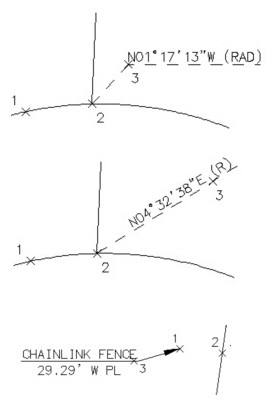 Label a radial bearing Label a radial bearing
SmartDraft® Labeling Tools:
- Rotate text and blocks along a selected arc or circle
- Change the bearing direction of text
- Change the text or arc text direction
- Edit text, mtext, attribute definitions, and the variable attributes of a block
- Change the position of existing labels
- Change existing label's precision
- Scale existing labels or arc text
- Create crow's feet by selecting labels in the drawing
- Create crow's feet in user specified direction and size
- Insert an arrow with or without a break symbol
- Create tick marks at endpoints of lines and arcs
- Create abutment symbol along selected object
SmartDraft® Monuments Help the User to:
- Create
monument symbols for mapping
SmartDraft® Label Masking Assists the User to:
- Place a mask behind selected text, mtext, attributes, dimensions, or arc text
- Remove the mask from selected text, mtext, attributes, dimensions, or arc text
|
|
SITE MAP | PRIVACY POLICY | LICENSE AGREEMENT | TERMS AND CONDITIONS
AutoCAD is a registered trademark of Autodesk, Inc. SmartDraft is a registered trademark of SmartDraft, Inc.
Microsoft is a registered trademark of Microsoft Corporation. All other brand names, product names, or trademarks belong to their respective holders.
|