
 |
|


 |
 |

|

|
 |
 |
 |
 |
| Labeling Tools: Dimensions |
|
The SmartDraft Dimension commands automatically create the dimension style using the drawing's horizontal scale.
|
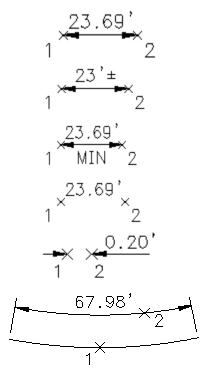 These SmartDraft commands use the AutoCAD® Dimension object or a polyline with text. When placing dimensions, the current DVIEW angle is used to correctly rotate the label.
SITE MAP | PRIVACY POLICY | LICENSE AGREEMENT | TERMS AND CONDITIONS
AutoCAD is a registered trademark of Autodesk, Inc. SmartDraft is a registered trademark of SmartDraft, Inc.
Microsoft is a registered trademark of Microsoft Corporation. All other brand names, product names, or trademarks belong to their respective holders.